A franchisee voids an invoice. Nothing unusual about that — the customer disputed a charge, the job was re-quoted, it happens. Except head office already billed the management service fee on that invoice last month.
Now what? Issue a credit by hand? Knock it off next month’s fee and hope someone remembers why the number looks odd? Ignore it and wait for the franchisee to notice?
This is the real difficulty with MSF billing. The percentage is the easy part — any spreadsheet can multiply revenue by 8%. What breaks the process is everything around the percentage: the voids, the exceptions, the franchises that don’t fit the standard arrangement. We wrote before about why manual MSF calculation eats time. This post is about the edge cases — because they’re where the disputes actually start.
Edge case 1: the voided invoice
The scenario above is the most common one. A fee has been charged on revenue that, it turns out, never existed. Handled manually, this means a correction someone has to notice, calculate, and explain — and if it’s missed, the franchisee is quietly overpaying.
Jobs360 calculates MSF on the net of billed invoices. When a previously-charged invoice is voided, the credit is applied to the next fee invoice automatically. No one has to spot it, and the franchisee can see exactly where the adjustment came from.
There’s a second-order problem here, too. If credits are automatic, could a franchisee game the system — invoice heavily one period, void after the fee run? Possibly, which is why voids and credits are surfaced in the head-office dashboards rather than silently netted off. A pattern of convenient voids is visible at a glance, and head office can withhold a credit while it asks the question.
Edge case 2: not every franchise pays the same
The standard rate is the standard rate — until it isn’t. Founding franchisees on legacy terms. A struggling territory on a temporary reduction. A company-owned franchise that shouldn’t be billed at all.
In a spreadsheet, these exceptions live in someone’s head, or in a note in cell H14. Every one of them is a chance to bill the wrong amount, and every wrong amount is an awkward conversation.
Jobs360 handles this with fee templates: one default template for the network, a custom template for any franchise that needs different terms, and an exempt flag for the ones that shouldn’t be charged at all. The exception is recorded where the billing happens, not alongside it.
Edge case 3: switching on mid-stream
Networks don’t adopt MSF automation on day one of their existence. There’s history — invoices from before the system, fees already billed under the old process. If the automated run picks all of that up, the first fee invoices double-charge everything.
This is what cut-over dates are for. A network-wide “invoices after” date draws a clean line: fees are calculated only on invoices from that date forward. Individual franchises can have their own cut-over too, which matters when franchisees joined the system at different times. The first automated run starts from the line, not from the beginning of recorded history.
Edge case 4: the judgement calls
Some things shouldn’t be automated. A one-off arrangement with a franchisee. An invoice that both sides agree shouldn’t attract a fee this period. A charge for something outside the normal fee structure.
The mistake is treating automation as all-or-nothing. Jobs360 lets head office exclude an individual invoice from a fee calculation — with the reason and the person who made the call recorded — add a one-off line to a fee invoice, or regenerate an invoice or a whole period if something material changes. The automation does the routine work; the judgement calls stay human, and they leave a trail.
Drafts before demands
One last detail that saves more arguments than any of the above: fee invoices are created as drafts. Head office reviews them — with the dashboards showing the period’s MSF, outstanding fees, and anything unusual — before issuing. Franchisees see only their own issued invoices, never the working-out.
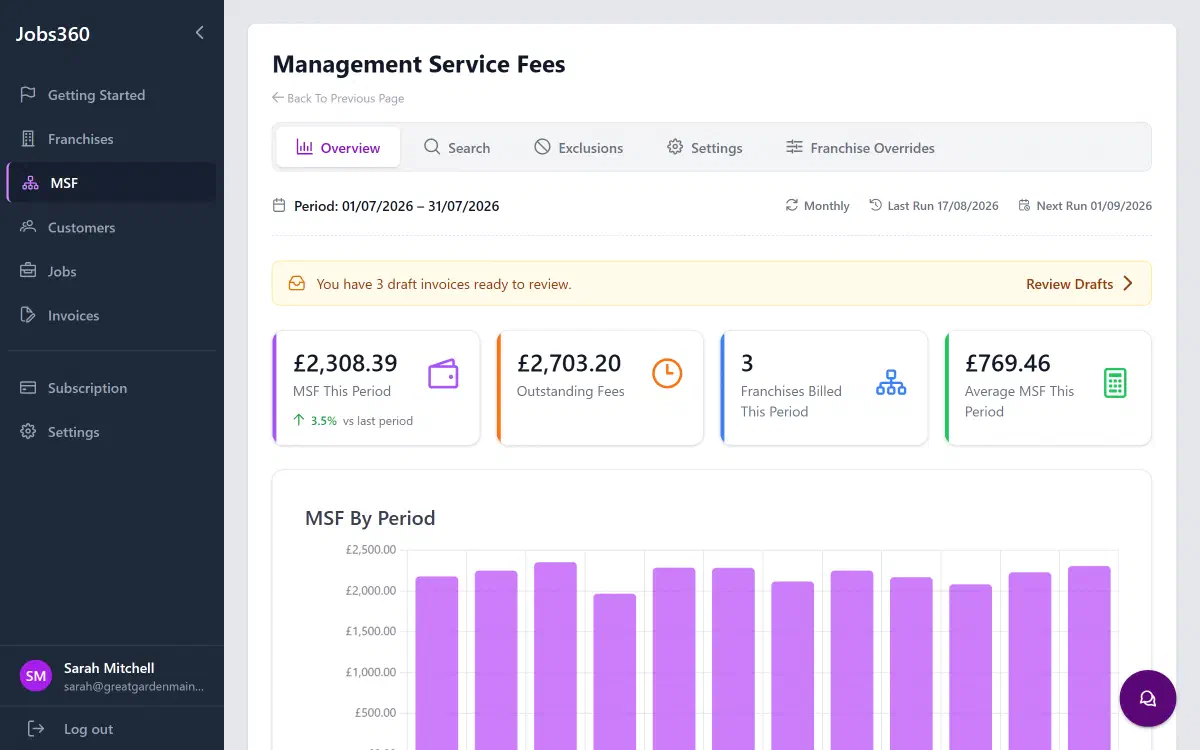
That review step is where edge cases get caught while they’re still cheap. A number that looks wrong in a draft is a two-minute check. The same number on an issued invoice is a dispute.
The pattern
Every one of these edge cases has the same shape: a fact about the billing relationship that lives outside the calculation. Handled manually, those facts scatter across emails, memories, and spreadsheet notes — and resurface as disputes. Handled in the system, they’re just part of how the fee run works.
The percentage was never the problem.
Jobs360 calculates and issues MSF invoices automatically, edge cases included. See how it works or get in touch with questions about your network’s setup.